If you have added a family member, entered their email, and ticked ‘Send Invite email to family member’, they will receive an email saying you’ve invited them and be prompted to accept the invite and log in or create an account. They will see a ‘Pending Family Invite’ at the top of their Dashboard.
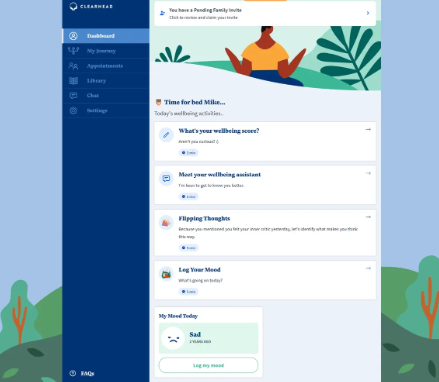
When they click this they will be prompted to click ‘Claim Invitation’.
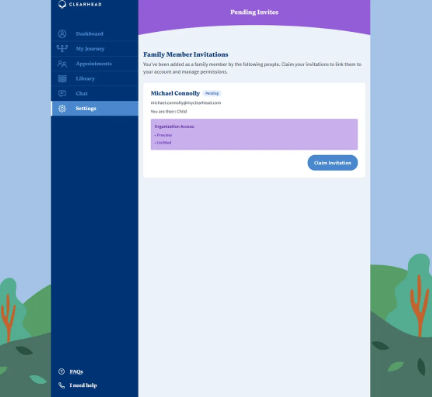
If you have linked them to your EAP offering when you created their account they can access these benefits. If they want to confirm the benefits (for example, how many therapy sessions are available to them) they can view this from Settings > My Subscription > My Memberships.
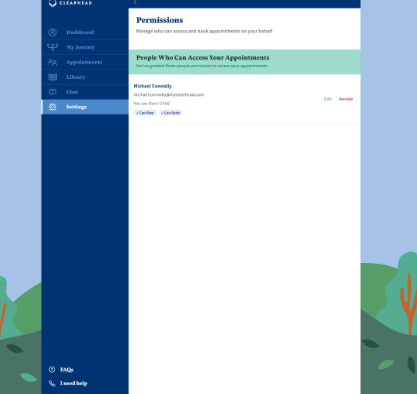
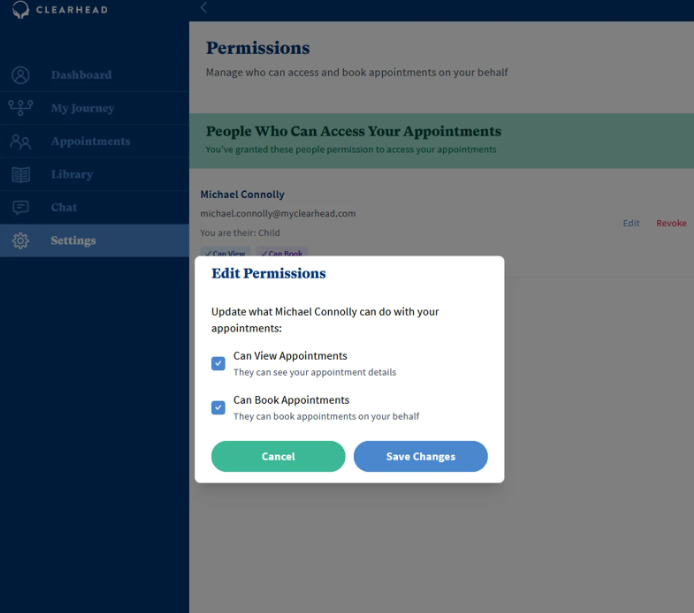
If they wish to take control of the bookings they can revoke your access from viewing their appointments from Settings > Permissions by clicking Revoke. The family member can then choose to revoke access for you to view appointments and/or book appointments on their behalf. If these permissions are revoked, their appointments will be removed from your Appointments screen.
Was this article helpful?
That’s Great!
Thank you for your feedback
Sorry! We couldn't be helpful
Thank you for your feedback
Feedback sent
We appreciate your effort and will try to fix the article